Scalability & Load Balancing
2026-03-23awsscalabilityload-balancingdistributed-systemsauto-scaling
1. Why Scalability Matters
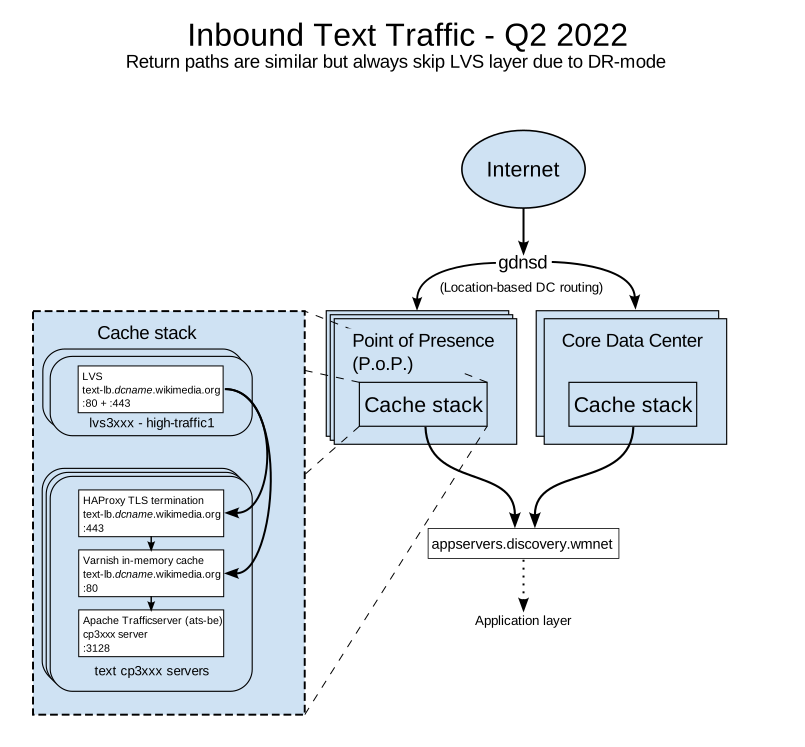
Scalability is the measurable ability to add capacity so that throughput grows roughly in proportion to resources—without rewriting the system every traffic milestone. On AWS, that usually means Elastic Load Balancing in front of Auto Scaling Groups or ECS/Fargate services, RDS/Aurora or DynamoDB for data, ElastiCache for hot working sets, and CloudFront for edge offload. Performance is how fast one unit of work is; scalability is how many units you can run in parallel before correctness, latency, or cost breaks.
1.1 Real-World Failures (What Actually Breaks)
| Incident class | Public example (pattern) | First AWS signals | Typical root chain |
|---|---|---|---|
| Traffic spike / “hug of death” | Viral link floods a small site (often called “Reddit hug of death” in folklore) | ALB HTTPCode_Target_5XX_Count ↑, TargetResponseTime p99 ↑ | No autoscale headroom → thread pools stall → timeouts → retries amplify load |
| Partial outage + degraded UX | Twitter “Fail Whale” era (overcapacity + fragile monolith) | ALB healthy host count drops, CloudWatch CPU pegged | Fan-out services fail together; no bulkhead isolation |
| Realtime messaging brownout | Slack historical outages (messaging stack + shard hot spots) | Kinesis iterator age, ElastiCache evictions, RDS replica lag | Hot keys + synchronized failures; websocket stickiness concentrates load |
| Payment / commerce | Any checkout meltdown during drop | API Gateway 429, WAF blocks, DynamoDB throttling | Rate limits and DB partitions hit at once |
These are not moral failures—they are queueing theory in production: once arrival rate exceeds service rate for long enough, queues grow without bound unless you shed load (backpressure), add capacity (autoscale), or cache (ElastiCache/CloudFront).
Named folklore (patterns, not live postmortems): the “Reddit hug of death” describes a small origin buried when a large aggregator links it—CloudFront misses and ALB targets saturate in minutes. Twitter’s “Fail Whale” era illustrated how a globally shared, tightly coupled stack turns partial overload into user-visible hard failure rather than graceful degradation. Slack-class real-time messaging outages often combine shard hot spots, websocket stickiness, and retry amplification—the fix is almost always better partitioning, backpressure, and isolated pools, not “more logging.”
1.2 The Cost of Downtime (Order-of-Magnitude)
| Industry segment | Revenue-at-risk heuristic | Why AWS scale primitives matter |
|---|---|---|
| Large e-commerce | $100k–$1M+ / hour at peak (cart + search + payments) | ASG + ALB + DynamoDB on-demand absorb flash crowds |
| SaaS B2B | 10–30% of ARR customers evaluate reliability in trials | Multi-AZ RDS, Route 53 health checks, blue/green on ALB |
| Ad-tech / bidding | $1k–$50k / minute during skewed auctions | NLB + sub-ms paths; ElastiCache for frequency caps |
| Finance (retail brokerage) | Regulatory + reputational tail risk dominates pure $/hr | Strict RPO/RTO drives Aurora Global, warm standby |
Numbers vary by company; the architectural lesson is identical: tail latency and error rate convert directly to lost transactions when clients retry and dependencies stack.
1.3 Scalability vs Performance vs Elasticity
| Term | Definition | AWS example |
|---|---|---|
| Performance | Time/resources for one logical operation | Tuning JVM GC, SQL indexes on RDS |
| Scalability | Throughput vs resources as load grows | Add ECS tasks behind ALB |
| Elasticity | Speed and granularity of scale in and out | Fargate tasks in seconds; DynamoDB on-demand |
| Efficiency | $ / successful request at target SLO | Graviton (c7g) + CloudFront cache hit ratio |
Elasticity without discipline is expensive
EC2 On-Demand scale-out in minutes can save an outage; Fargate adds even faster—but if every instance opens 500 DB connections, elasticity multiplies a database incident. Pair compute elasticity with RDS Proxy, connection budgets, and cached reads.
flowchart TB
    subgraph Clients["Clients"]
        U[Web / Mobile / Partners]
    end

    subgraph Edge["AWS Edge & Entry"]
        CF[Amazon CloudFront]
        WAF[AWS WAF]
        ALB[Application Load Balancer]
    end

    subgraph App["Compute — ECS on Fargate / EC2 ASG"]
        T1[Task / Instance 1]
        T2[Task / Instance 2]
        T3[Task / Instance 3]
    end

    subgraph Data["Data plane"]
        R[Amazon ElastiCache Redis]
        DB[(Amazon Aurora PostgreSQL)]
    end

    U --> CF --> WAF --> ALB
    ALB --> T1
    ALB --> T2
    ALB --> T3
    T1 --> R
    T2 --> R
    T3 --> R
    T1 --> DB
    T2 --> DB
    T3 --> DB

    T2 -.->|"thread pool saturated → 504"| ALB
    U -.->|"retry storm"| ALB
    DB -.->|"replica lag / conn limit"| T1

    style T2 fill:#fecaca,stroke:#b91c1c
style DB fill:#fecaca,stroke:#b91c1c1.4 Throughput Anchors (Use These for Back-of-Envelope)
| Component (indicative) | Warm, well-tuned ballpark | What invalidates it |
|---|---|---|
| Spring Boot JSON API on 2× c7g.large | 2k–6k RPS combined, p50 ~5–20ms app-only | N+1 SQL, giant DTO serialization, blocking I/O |
| Aurora PostgreSQL read-heavy | ~10k–40k simple reads/s on db.r6g.large class | Contention, fsync-heavy writes, poor indexes |
| ElastiCache Redis cluster | 100k+ tiny ops/s per shard | Large values, MONITOR in prod, hot keys |
| ALB | Millions of requests/day is routine; watch LCUs | Large TLS handshakes, tiny objects, cross-AZ charges |
Treat every number as a hypothesis validated with CloudWatch + load tests (e.g. Distributed Load Testing on AWS or k6 on EC2).
2. Vertical vs Horizontal Scaling
Vertical scaling (scale up / scale up) increases capacity per node: more vCPU, RAM, network baseline, or faster EBS/io2. Horizontal scaling (scale out) increases node count behind Elastic Load Balancing and splits work across replicas. AWS rarely forces a single choice—you vertically scale the database writer until sharding, and horizontally scale stateless Spring services until economics or data locality push you toward partitioning.

2.1 Ten-Dimension Comparison
| Dimension | Vertical | Horizontal | AWS tie-in |
|---|---|---|---|
| Unit of growth | Bigger instance type | More tasks/instances | EC2 types vs ASG desired capacity |
| Elasticity speed | Minutes–hours (resize, reboot) | Seconds–minutes (Fargate) | Warm pools, predictive scaling |
| Fault isolation | Single-node blast radius | Node failure is routine | Multi-AZ + min healthy % |
| State assumptions | Tempts local disk/session | Forces S3/Redis/DynamoDB | 12-factor on ECS |
| Licensing | Often priced per core | More instances can multiply license cost | Bring-your-own-license on Dedicated Hosts |
| Network fan-out | One ENI cap | Many ENIs aggregate | Enhanced networking, placement groups |
| Cost curve | Superlinear past a knee | Near-linear if app is parallel | Savings Plans + Graviton |
| Operational complexity | Lower instance count | Fleet hygiene, deploy orchestration | CodeDeploy blue/green |
| Data layer fit | Strong for OLTP writer | Strong for read replicas, caches | Aurora Replicas, DynamoDB |
| Limits | Instance family maximums | Per-region service quotas | Service Quotas console |
2.2 When Vertical Wins
- Relational primary writer where single-writer semantics dominate (RDS Multi-AZ failover pair).
- Licensed middleware (some APM, commercial ETL) billed per physical/logical CPU.
- In-memory working set that must stay on-box (careful: prefer ElastiCache cluster mode instead when durability requirements allow).
2.3 When Horizontal Wins
- Stateless HTTP/gRPC services (Spring WebFlux or properly sized Tomcat thread pools).
- Read-mostly traffic served from Aurora replicas + ElastiCache.
- Burst-shaped workloads where on-demand horizontal beats always-provisioned giants.
2.4 AWS Instance Families (Web Tier Cheat Sheet)
| Family | Typical use | vCPU/RAM skew | Notes |
|---|---|---|---|
| M7g/M6g | General Spring services | Balanced | Graviton price/perf |
| C7g/C6i | CPU-heavy JSON/transform | Compute-heavy | Watch EBS throughput |
| R7g | Large heap + embedded caches | Memory-heavy | Still prefer Redis for shared cache |
| T3/T4g | Dev/test, spiky burstable | Cheap baseline | CPU credits—avoid for steady prod |
RDS/Aurora classes follow similar logic: db.r6g.* for memory-heavy shared_buffers, db.m6g.* for balanced OLTP.
2.5 Cost Curve: When Horizontal Becomes Cheaper
Assume a Spring service needs 32 vCPU-equivalent steady throughput:
| Model | Illustrative monthly compute (us-east-1, On-Demand ballpark) | Comment |
|---|---|---|
| 1× very large | ~$2.5k–$4k+ for a metal-ish 32 vCPU class | Fewer instances, bigger blast radius |
| 8× c7g.large (2 vCPU) | ~8 × $60–$80 ≈ $480–$640 | More ENIs, more ALB targets, better fault isolation |
Real bills add ALB LCU, data transfer, and RDS—but the pattern holds: commodity horizontal often beats hero instance once your software is parallel.
Vertical-only databases hit a hard wall
You can scale up Aurora for a long time—but writer throughput and locking still centralize. Plan read replicas, partitioning, or DynamoDB for the subset of workloads that are append-mostly or key-value shaped.
flowchart TB
    subgraph V["Vertical — one big box"]
        BIG[Single EC2 / very large task<br/>32 vCPU / 128 GiB RAM]
        DB1[(Aurora writer)]
        BIG --> DB1
    end

    subgraph H["Horizontal — many small boxes behind ALB"]
        ALB[Application Load Balancer]
        S1[Small task 2 vCPU]
        S2[Small task 2 vCPU]
        S3[Small task 2 vCPU]
        SN[... N tasks]
        DB2[(Aurora writer + replicas)]
        ALB --> S1
        ALB --> S2
        ALB --> S3
        ALB --> SN
        S1 --> DB2
        S2 --> DB2
        S3 --> DB2
        SN --> DB2
    end

    style BIG fill:#fde68a,stroke:#d97706
    style ALB fill:#bfdbfe,stroke:#2563eb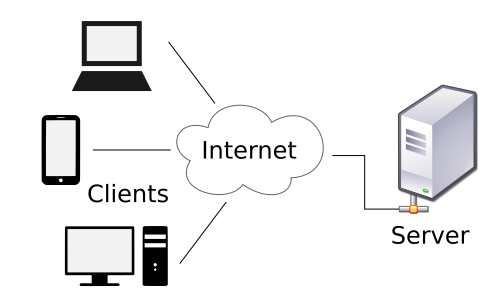
3. Load Balancing — Complete Deep Dive
Managed Elastic Load Balancing is the control plane that turns a pool of targets into one logical endpoint. For Spring services, ALB is the default front door; NLB appears for VPC endpoint-style traffic, extreme CPS, TLS passthrough, or non-HTTP protocols; Gateway Load Balancer (GWLB) integrates third-party appliances (firewalls, IDS) as transparent bump-in-the-wire.
3.1 What Is a Load Balancer?
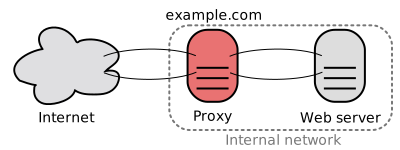
A load balancer is a reverse proxy with health-aware scheduling. Clients connect to ELB DNS; ELB forwards to EC2/ECS/IP/Lambda targets registered in target groups.
| Responsibility | User-visible effect | AWS implementation |
|---|---|---|
| Traffic distribution | Even spread (ideally) | Target selection algorithm + weighted routing |
| Health gating | Bad nodes stop receiving flow | Target group health checks |
| TLS | Certificate lifecycle centralized | ACM cert on ALB; or passthrough on NLB |
| Routing | Host/path rules | ALB listener rules |
| Observability | Latency and error budgets | CloudWatch ELB metrics, Access logs to S3 |
3.1.1 Health Checks — Deep Dive
| Check style | What it proves | Best for | AWS surface |
|---|---|---|---|
HTTP(S) GET /health | App process + servlet stack alive | Spring Boot Actuator | ALB target group |
| HTTP code + body match | Deep dependency probe | DB readiness guarded | Custom /ready |
| TCP :8080 | Port accepts connections | Legacy, gRPC behind NLB | NLB health |
gRPC health (grpc.health.v1) | Service-specific readiness | gRPC microservices | ALB gRPC health (supported configurations) |
Tuning knobs (typical prod starting point):
- Interval: 10–30s depending on blast radius vs detection speed.
- Healthy threshold: 2–5 consecutive successes.
- Unhealthy threshold: 2–3 failures—tight enough to shed bad nodes, loose enough to avoid flapping.
- Timeout: < interval, often 3–5s for HTTP.
Separate liveness from readiness
Expose /live (process up) and /ready (dependencies OK). Register only /ready with the ALB once your service can safely take production queries—otherwise you absorb traffic while still warming caches or migrating schema.
3.1.2 Connection Draining & Deregistration Delay
When an ECS task scales in or a CodeDeploy hook deregisters a target, ELB stops new connections while allowing in-flight requests to complete—deregistration delay (default 300s on ALB target groups, tunable). For Spring, align:
server.shutdown=graceful(Boot 2.3+) withspring.lifecycle.timeout-per-shutdown-phase- ALB deregistration delay ≥ worst-case request time + drain margin
3.1.3 TLS Termination vs Passthrough
| Mode | Where cert lives | Visibility | When |
|---|---|---|---|
| Terminate at ALB | ACM on ALB | ALB sees HTTP path/host | Most Spring MVC |
| Terminate on container | Cert in Secrets Manager | ALB can still L7 if HTTP cleartext internally | mTLS patterns |
| NLB TLS passthrough | Backend terminates | NLB sees encrypted stream | Strict compliance, custom TLS features |
3.2 Load Balancing Algorithms
The following diagrams are conceptual—AWS does not expose every knob—but they match how schedulers reason about targets.
3.2.1 Round Robin
flowchart LR
    LB[Scheduler]
    A[Target A]
    B[Target B]
    C[Target C]
    LB -->|req 1| A
    LB -->|req 2| B
    LB -->|req 3| C
LB -->|req 4| AAWS mapping: Homogeneous ECS tasks behind ALB approximate RR when sessions are short and targets equally healthy.
3.2.2 Weighted Round Robin
flowchart TB
    LB[Weighted scheduler]
    A["Target A — weight 3"]
    B["Target B — weight 1"]
    LB -->|"3 of 4 slots"| A
LB -->|"1 of 4 slots"| BAWS mapping: ALB weighted target groups in forward actions; canary sends 5% to new version.
3.2.3 Least Connections
flowchart TB
    LB[Least-conn scheduler]
    A["Target A — 12 conns"]
    B["Target B — 4 conns"]
    C["Target C — 9 conns"]
LB -->|"next request"| BUse when: WebSocket, SSE, or long-polling skews duration—ALB + sticky can worsen imbalance; least-conn style behaviors often live in Envoy/mesh layers, but target health + slow start on ALB mitigates cold caches.
3.2.4 Least Response Time (Conceptual)
Schedulers prefer targets with lower moving-average latency. ELB does not expose pure LRT as a user setting; you approximate with slow start, connection draining, and autoscale on TargetResponseTime.
3.2.5 IP Hash / Source Affinity
flowchart LR
    C1["Client IP 203.0.113.10"]
    C2["Client IP 198.51.100.7"]
    LB["Hash of IP mod N"]
    A[Target A]
    B[Target B]
    C1 --> LB --> A
C2 --> LB --> BAWS mapping: ALB stickiness uses load balancer generated cookie or application cookie—conceptually similar to affinity.
Sticky sessions fight autoscale
Affinity concentrates power users on a subset of nodes and breaks uniform CPU metrics used by target tracking policies. Externalize session to ElastiCache or use JWT unless you have a hard constraint.
3.2.6 Consistent Hashing — Full Deep Dive
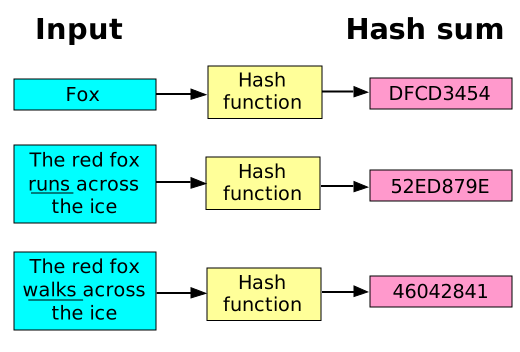
Problem: hash(key) % N remaps most keys when N changes—cache hit ratio collapses during resharding.
Idea: Hash both keys and nodes to points on a ring. Each key belongs to the next node clockwise. Adding/removing a node only moves keys in adjacent arcs.
flowchart LR
    N1["Node A on ring"]
    N2["Node B on ring"]
    N3["Node C on ring"]
    K["Key hashes to arc between A and B → owner B"]
    N1 --- N2 --- N3 --- N1
K -.-> N2Virtual nodes: Each physical node owns many tokens on the ring to reduce skew when counts are small—ElastiCache Redis (cluster mode) uses hash slots (16,384) conceptually similar to a discretized ring.
Ketama-style clients: Memcached clients (historically Ketama) minimized remapping; modern Redis cluster clients use CRC16 slot tables with MOVED/ASK redirections.
| Aspect | Modulo hashing | Consistent hashing + vnodes |
|---|---|---|
| Resize churn | O(keys) remapped | O(keys / N) expected |
| Hot spots | Rare if uniform | Possible without vnodes |
| AWS echo | Poor for ElastiCache scale-in | Matches slot migration story |
3.2.7 Random with Two Choices (“Power of Two”)
flowchart TB
    LB[Scheduler]
    T1["Random pick A — load 3"]
    T2["Random pick B — load 9"]
LB -->|"choose min"| T1Why it matters: Maximum load drops from Θ(log N / log log N) vs Θ(log N / log log log N)-style behavior (classic balls-into-bins result)—used in distributed caches and some L4/L7 implementations internally.
3.2.8 Algorithm Comparison Table
| Algorithm | State needed | Resize friendliness | Typical AWS pattern |
|---|---|---|---|
| Round robin | Index | Neutral | Default-ish ALB |
| Weighted RR | Weights | Neutral | Canary weights |
| Least connections | Active conn counts | Neutral | Often mesh/NGINX; mitigate via slow start |
| Least response time | Latency EWMA | Neutral | Custom metrics → autoscale |
| IP hash / sticky | Client id | Poor | ALB stickiness |
| Consistent hash | Ring/slots | Strong | ElastiCache slots; app-level gRPC |
| Two choices | Sampled load | Neutral | Internal LB optimizations |
3.3 Layer 4 vs Layer 7 Load Balancing
| Concern | NLB (L4) | ALB (L7) |
|---|---|---|
| Decision inputs | IP, port, protocol | HTTP host/path/headers, gRPC method |
| TLS | Passthrough common | Terminate at ACM |
| Latency overhead | Often sub-ms to ~1ms | ~1–3ms typical added |
| Static IP | Yes (Elastic IP per AZ) | Anycast DNS names |
| VPC private link patterns | NLB + Endpoint Service | ALB as target in some designs |
| WAF | Not on NLB path | AWS WAF integration |
flowchart TB
    subgraph L7["L7 — ALB"]
        C1[Client TLS]
        ACM[ACM certificate]
        RULE[Listener rules]
        TG1[Target group A]
        TG2[Target group B]
        C1 --> ACM --> RULE --> TG1
        RULE --> TG2
    end

    subgraph L4["L4 — NLB"]
        C2[Client]
        TCP[TCP/UDP flow]
        POOL[Target pool]
        C2 --> TCP --> POOL
endTLS implications: Terminating at ALB centralizes cipher policy and certificate renewal; NLB passthrough keeps payload opaque to AWS LB (compliance win, ops burden on app).
3.4 AWS ELB Deep Dive
3.4.1 Application Load Balancer (ALB)
| Feature | Detail | Spring impact |
|---|---|---|
| Path/host routing | Listener rules with priorities | /api/ → API service; /actuator/ blocked at WAF |
| Weighted target groups | % traffic per group | Canary deploys |
| Slow start | Gradually ramps target | Cold JVM JIT warmup |
| Sticky sessions | LB or app cookie | Avoid if possible |
| WAF | Managed rules | Block SSRF to IMDS |
| Pricing | LCU-hours (new connections, active connections, processed bytes, rule evaluations) | Large cookies + tiny JSON → byte-heavy |
flowchart TB
    I[Internet]
    ALB[ALB subnets public]
    L[Listener :443]
    R1[Rule priority 10 — host api.*]
    R2[Rule priority 20 — default]
    TG1[Target group — spring-api]
    TG2[Target group — spring-admin]
    ECS[ECS tasks private subnets]

    I --> ALB --> L --> R1 --> TG1 --> ECS
L --> R2 --> TG2 --> ECS3.4.2 Network Load Balancer (NLB)
| Feature | Detail |
|---|---|
| Static IP per AZ | Whitelist-friendly ingress |
| Preserved client IP | proxy_protocol_v2 or TCP options |
| Ultra-low latency | Millions of CPS capable |
| UDP | Real-time media, gaming |
| TLS passthrough | Backend owns cert |
flowchart LR
    C[Client]
    NLB[NLB — cross-zone optional]
    T1[Target AZ-a]
    T2[Target AZ-b]
    C --> NLB
    NLB --> T1
NLB --> T23.4.3 Classic Load Balancer (CLB)
Avoid for new designs. CLB is legacy EC2-Classic era; it lacks modern routing, WAF, and fine-grained metrics. Migrate to ALB/NLB.
CLB migration is not cosmetic
Moving to ALB changes stickiness semantics, health check paths, and CloudWatch metric namespaces—plan terraform state moves and DNS cutovers with weighted Route 53 if needed.
3.4.4 Gateway Load Balancer (GWLB)
GWLB load-balances GENEVE-encapsulated traffic to third-party appliances in VPC—think Palo Alto, Fortinet, Suricata. Return path is transparent. Pair with VPC endpoints for east-west inspection.
flowchart TB
    SRC[Application VPC traffic]
    GWL[Gateway Load Balancer]
    A1[Appliance 1]
    A2[Appliance 2]
    DST[Destination workload]
    SRC --> GWL --> A1
    GWL --> A2
A1 --> DST3.4.5 ELB Comparison (15+ Dimensions)
| Dimension | ALB | NLB | CLB | GWLB |
|---|---|---|---|---|
| OSI layer | L7 | L4 | L4/L7 legacy | L3 integration |
| Protocol focus | HTTP/S, gRPC | TCP/UDP/TLS stream | Mixed | GENEVE |
| Routing | Rich | IP:port | Limited | Appliance chain |
| Static IP | No | Yes | Yes | N/A |
| TLS terminate | Native | Optional passthrough | Yes | N/A |
| WAF | Yes | No | No | No |
| Latency | Higher | Lowest | Varies | Adds hop |
| Cross-zone | Configurable | Configurable | Yes | Topology-specific |
| Targets | IP/instance/Lambda | IP/instance | EC2 | Appliances |
| Health checks | HTTP/gRPC | TCP/HTTP | HTTP/TCP | Appliance-defined |
| Stickiness | Cookie | Flow-based | Yes | N/A |
| Use with ECS | Excellent | Good | Legacy | Sidecar patterns |
| PrivateLink | Via patterns | Common | Limited | Common |
| Observability | Access logs, metrics | Metrics | Basic | Partner metrics |
| New designs? | Default HTTP | TCP/gaming | No | Security VPC |
3.4.6 Cost Comparison (Illustrative)
| Charge | ALB | NLB |
|---|---|---|
| Hourly | ~$0.0225/hr per ALB (region-dependent) | Similar order |
| LCU / NLCU | LCU blends connections/bytes/rules | NLCU connection/byte oriented |
| Data processing | Per GB through ALB | Per GB through NLB |
Rule of thumb: ALB tax is worth it when L7 routing/WAF saves application complexity; use NLB when $ per million packets and latency dominate.
4. Scaling the Web Tier
Stateless Spring services are the horizontal scaling sweet spot: any task behind ALB can serve any request if session and uploads live in AWS-managed stores.
flowchart TB
    subgraph BAD["Stateful anti-pattern"]
        ALB1[ALB]
        A[Instance A — session in RAM]
        B[Instance B]
        ALB1 --> A
        ALB1 --> B
    end

    subgraph GOOD["Stateless + AWS backends"]
        ALB2[ALB]
        T1[Task 1]
        T2[Task 2]
        R[Amazon ElastiCache Redis sessions]
        S3[Amazon S3 assets]
        ALB2 --> T1
        ALB2 --> T2
        T1 --> R
        T2 --> R
        T1 --> S3
        T2 --> S3
end4.1 Stateless Design Patterns (12-Factor on AWS)
| Principle | Violation smell | AWS-aligned fix |
|---|---|---|
| Config | Secrets in WAR | Secrets Manager / SSM Parameter Store |
| Backing services | Hostname hard-coded | RDS Proxy endpoint, ElastiCache config endpoint |
| Processes | Local sticky files | EFS only if unavoidable; prefer S3 |
| Port binding | Random ports | ALB target port fixed (8080) |
| Concurrency | Giant single JVM | Right-size + scale out |
| Disposability | 10-minute drain | Tune deregistration delay + graceful shutdown |
| Dev/prod parity | Different ALB rules | IaC (CloudFormation/CDK/Terraform) |
4.2 Session Management Deep Dive
| Approach | Storage | Pros | Cons | AWS services |
|---|---|---|---|---|
| JWT access + refresh | Client-held | Trivially horizontal | Revocation lists; size | Cognito / custom JWK on ACM |
| Server session in Redis | ElastiCache | Fast invalidation | Redis SPOF → Multi-AZ | Redis OSS |
| DynamoDB sessions | DynamoDB | Durable, TTL native | ms slower than Redis | DynamoDB TTL |
| Sticky ALB | Instance RAM | Low code | Uneven load | ALB stickiness |
Spring Session + Redis is the interview-safe default
Spring Session with ElastiCache for Redis gives you horizontally uniform requests with a small cookie (SESSION). Turn off ALB stickiness once Redis sessions work.
4.2.1 JWT Sketch (Stateless Claims)
// File: JwtSubject.java
package com.example.scale.session;

import java.util.Objects;

public final class JwtSubject {
    private final String userId;
    private final String tenantId;

    public JwtSubject(String userId, String tenantId) {
        this.userId = Objects.requireNonNull(userId);
        this.tenantId = Objects.requireNonNull(tenantId);
    }

    public String userId() {
        return userId;
    }

    public String tenantId() {
        return tenantId;
    }
}// File: JwtAuthenticationFilter.java
package com.example.scale.session;
import jakarta.servlet.FilterChain;
import jakarta.servlet.ServletException;
import jakarta.servlet.http.HttpServletRequest;
import jakarta.servlet.http.HttpServletResponse;
import java.io.IOException;
import java.util.List;
import org.springframework.http.HttpHeaders;
import org.springframework.security.authentication.UsernamePasswordAuthenticationToken;
import org.springframework.security.core.authority.SimpleGrantedAuthority;
import org.springframework.security.core.context.SecurityContextHolder;
import org.springframework.web.filter.OncePerRequestFilter;
public class JwtAuthenticationFilter extends OncePerRequestFilter {
private final JwtValidator validator;
public JwtAuthenticationFilter(JwtValidator validator) {
this.validator = validator;
}
@Override
protected void doFilterInternal(
HttpServletRequest request, HttpServletResponse response, FilterChain filterChain)
throws ServletException, IOException {
String header = request.getHeader(HttpHeaders.AUTHORIZATION);
if (header == null || !header.startsWith("Bearer ")) {
filterChain.doFilter(request, response);
return;
}
String token = header.substring(7);
JwtSubject subject = validator.validate(token);
var auth =
new UsernamePasswordAuthenticationToken(
subject, null, List.of(new SimpleGrantedAuthority("ROLE_USER")));
SecurityContextHolder.getContext().setAuthentication(auth);
filterChain.doFilter(request, response);
}
}// File: JwtValidator.java
package com.example.scale.session;
public interface JwtValidator {
JwtSubject validate(String jwt);
}4.2.2 Spring Session with Redis (ElastiCache)
application.yml (Spring Boot 3.2+ style):
spring:
  data:
    redis:
      host: "${REDIS_HOST:localhost}"
      port: "${REDIS_PORT:6379}"
      ssl:
        enabled: true
  session:
    store-type: redis
    redis:
      namespace: "spring:session"
server:
  servlet:
    session:
      cookie:
        name: "SESSION"
Gradle dependencies (reference):
// build.gradle.kts (excerpt)
dependencies {
    implementation("org.springframework.boot:spring-boot-starter-data-redis")
    implementation("org.springframework.session:spring-session-data-redis")
    implementation("org.springframework.boot:spring-boot-starter-security")
}
4.3 Auto Scaling Groups — Deep Dive
| Feature | Purpose | AWS details |
|---|---|---|
| Launch template | Immutable AMI + IAM + user data | Version per deploy |
| Lifecycle hooks | Pause for drain / warm-up | Lifecycle Hook → EventBridge |
| Warm pool | Pre-init instances | Faster scale-out |
| Mixed instances | Spot + On-Demand | Capacity-optimized allocation |
| Health checks | Replace bad nodes | ELB health integration |

flowchart TB
    TG[ALB Target Group]
    ASG[Auto Scaling Group]
    LT[Launch Template v37]
    H[Lifecycle Hooks]
    A1[Instance i-aaa]
    A2[Instance i-bbb]
    CW[CloudWatch Alarms]
    POL[Step/Target Tracking Policies]

    ASG --> LT
    ASG --> H
    ASG --> A1
    ASG --> A2
    TG --> A1
    TG --> A2
CW --> POL --> ASG4.4 Blue/Green and Canary with ALB
| Pattern | Traffic shift | Rollback | AWS building blocks |
|---|---|---|---|
| Blue/Green | 0%→100% flip | Point alias back | Second target group, CodeDeploy |
| Canary | 5%→25%→100% | Reduce weight | Weighted forward rules |
| Linear | Stepped growth | Automation | CodeDeploy hooks + CloudWatch alarms |
Use readiness gates on green
Before shifting 100%, assert green /ready and synthetic canaries via CloudWatch Synthetics against internal ALB rules—not only health checks.
4.5 Spring Boot Graceful Shutdown + Session Externalization
server:
  shutdown: graceful
spring:
  lifecycle:
timeout-per-shutdown-phase: "30s"// File: SecurityConfig.java
package com.example.scale.session;
import static org.springframework.security.config.Customizer.withDefaults;
import org.springframework.context.annotation.Bean;
import org.springframework.context.annotation.Configuration;
import org.springframework.security.config.annotation.web.builders.HttpSecurity;
import org.springframework.security.config.annotation.web.configuration.EnableWebSecurity;
import org.springframework.security.web.SecurityFilterChain;
@Configuration
@EnableWebSecurity
public class SecurityConfig {
@Bean
SecurityFilterChain filterChain(HttpSecurity http, JwtAuthenticationFilter jwtFilter)
throws Exception {
http.csrf(csrf -> csrf.disable())
.authorizeHttpRequests(
auth ->
auth.requestMatchers("/actuator/health", "/actuator/info")
.permitAll()
.anyRequest()
.authenticated())
.httpBasic(withDefaults())
.addFilterBefore(jwtFilter, org.springframework.security.web.authentication.BasicAuthenticationFilter.class);
return http.build();
}
@Bean
JwtAuthenticationFilter jwtFilter(JwtValidator validator) {
return new JwtAuthenticationFilter(validator);
}
}5. Scaling the Data Tier
5.1 Read Replicas (RDS & Aurora)
| Engine | Replica type | Replication | Typical lag |
|---|---|---|---|
| RDS PostgreSQL | Read replica | Async | < 1s to many seconds under load |
| Aurora | Aurora Replica | Shared storage + redo stream | Often < 100ms |
Spring routing: read-only transactions to replicas via routing datasource (shown below) or jOOQ/ORM replication drivers.
5.2 Aurora Architecture (Interview-Deep)
| Concept | Meaning | Why it scales reads |
|---|---|---|
| Shared storage volume | Replicas see same pages | No logical replication catch-up of full page server |
| Quorum writes | 4/6 copies for write durability | Survives AZ failure |
| Read scaling | Up to 15 Aurora replicas | Offload SELECT traffic |
| Writer | Single writer instance | Still the OLTP choke point |
Replica lag breaks read-your-writes
If a client writes then reads from a replica, they may see stale data. Fix with session stickiness to writer for that session, version tokens, or DynamoDB strong reads where applicable.
5.3 Connection Pooling — RDS Proxy & HikariCP
| Layer | Problem solved | Settings |
|---|---|---|
| HikariCP | Too many idle connections per JVM | maximumPoolSize ~10–30 per small service |
| RDS Proxy | N×instances explosion | IAM auth, multiplexing to DB |
spring:
  datasource:
    hikari:
      maximum-pool-size: 20
      minimum-idle: 5
      connection-timeout: 30000
      idle-timeout: 600000
      max-lifetime: 1800000
Order-of-magnitude: 200 ECS tasks × 50 pool = 10,000 conns → RDS hard limit failure. RDS Proxy collapses to hundreds of DB connections.
5.4 Database Sharding Strategies
| Strategy | Key range | Pros | Cons |
|---|---|---|---|
| Range | Time or id ranges | Range queries cheap | Hot latest shard |
| Hash | hash(tenantId) | Even spread | Cross-shard queries painful |
| Directory | Lookup service | Flexible | Single point unless HA |
| Geo | Region | Data residency | Cross-region joins |
flowchart TB
    subgraph R["Range shard"]
        R1["Shard A: ids 0-1M"]
        R2["Shard B: ids 1M-2M"]
    end

    subgraph H["Hash shard"]
        H1["Shard on hash(user)%N"]
    end

    subgraph D["Directory shard"]
        MAP[(Shard map in DynamoDB)]
        MAP --> Sx[Physical shard]
    end

    subgraph G["Geo shard"]
        US["us-east-1 primary"]
        EU["eu-west-1 primary"]
end5.4.1 Spring AbstractRoutingDataSource Example
// File: ShardKeyHolder.java
package com.example.scale.shard;

public final class ShardKeyHolder {
    private static final ThreadLocal<String> KEY = new ThreadLocal<>();

    private ShardKeyHolder() {}

    public static void set(String shard) {
        KEY.set(shard);
    }

    public static String get() {
        return KEY.get();
    }

    public static void clear() {
        KEY.remove();
    }
}// File: ShardingDataSource.java
package com.example.scale.shard;
import java.util.Map;
import javax.sql.DataSource;
import org.springframework.jdbc.datasource.lookup.AbstractRoutingDataSource;
public class ShardingDataSource extends AbstractRoutingDataSource {
public ShardingDataSource(Map<Object, Object> shardTargets) {
setTargetDataSources(shardTargets);
afterPropertiesSet();
}
@Override
protected Object determineCurrentLookupKey() {
return ShardKeyHolder.get();
}
}// File: ShardFilter.java
package com.example.scale.shard;
import jakarta.servlet.FilterChain;
import jakarta.servlet.ServletException;
import jakarta.servlet.http.HttpServletRequest;
import jakarta.servlet.http.HttpServletResponse;
import java.io.IOException;
import org.springframework.web.filter.OncePerRequestFilter;
public class ShardFilter extends OncePerRequestFilter {
@Override
protected void doFilterInternal(
HttpServletRequest request, HttpServletResponse response, FilterChain filterChain)
throws ServletException, IOException {
String tenant = request.getHeader("X-Tenant-Id");
if (tenant != null) {
ShardKeyHolder.set("tenant-" + Math.floorMod(tenant.hashCode(), 4));
}
try {
filterChain.doFilter(request, response);
} finally {
ShardKeyHolder.clear();
}
}
}5.5 Cross-Shard Queries
| Pattern | Mechanism | Cost |
|---|---|---|
| Scatter/gather | Query all shards | N× latency |
| Aggregator service | Step Functions / EMR | Batch acceptable |
| Denormalized read model | DynamoDB GSI / OpenSearch | Write amplification |
5.6 DynamoDB as a Scaling Escape Hatch
| Concept | Rule | AWS knob |
|---|---|---|
| Partition key | Cardinality + even spread | On-demand or auto-scaling |
| Hot partition | Split key or write sharding suffix | Contributor Insights |
| GSI | Alternate access patterns | Eventually consistent reads |
| Strongly consistent | Rare, doubles RCU on read | ConsistentRead=true |
5.7 RDS vs Aurora vs DynamoDB
| Dimension | RDS PostgreSQL | Aurora PostgreSQL | DynamoDB |
|---|---|---|---|
| Model | Relational | Relational | Key-value / document |
| Write scale-up | Vertical + read replicas | Bigger writer + replicas | Horizontal partitions |
| Joins | Rich | Rich | Denormalize |
| Latency | ms | ms (often lower read) | single-digit ms |
| Ops | Patching managed | Storage auto-grow | Serverless-friendly |
| Cost driver | Instance + storage | I/O + instances | RCU/WCU or on-demand |
6. Caching — Complete Deep Dive
Caching trades staleness for latency and cost. On AWS, ElastiCache for Redis or Memcached, DynamoDB DAX (for DynamoDB), CloudFront, and API Gateway cache layers stack into a multi-level hierarchy.
6.1 Why Caching Works
| Principle | Implication for systems |
|---|---|
| Temporal locality | Recent keys repeat (session, config) |
| Spatial locality | Nearby keys accessed together (product catalog pages) |
| Zipf-like popularity | Top 1% keys can dominate 50%+ of reads—cache them |
Empirical anchor: A 90% hit ratio on ElastiCache reduces origin DB QPS by 10× for that subset.
6.2 Cache-Aside (Lazy Loading)
Flow: App reads cache → on miss, read DB → populate cache with TTL.
// File: CacheAsideProductService.java
package com.example.scale.cache;

import java.time.Duration;
import java.util.Optional;
import org.springframework.data.redis.core.StringRedisTemplate;
import org.springframework.stereotype.Service;

@Service
public class CacheAsideProductService {

    private final StringRedisTemplate redis;
    private final ProductRepository repository;

    public CacheAsideProductService(StringRedisTemplate redis, ProductRepository repository) {
        this.redis = redis;
        this.repository = repository;
    }

    public Optional<Product> findById(long id) {
        String key = "product:" + id;
        String cached = redis.opsForValue().get(key);
        if (cached != null) {
            return Optional.of(Product.deserialize(cached));
        }
        Optional<Product> loaded = repository.findById(id);
        loaded.ifPresent(
                p -> redis.opsForValue().set(key, p.serialize(), Duration.ofMinutes(10)));
        return loaded;
    }

    public void evict(long id) {
        redis.delete("product:" + id);
    }
}// File: Product.java
package com.example.scale.cache;
import java.util.Objects;
public final class Product {
private final long id;
private final String name;
public Product(long id, String name) {
this.id = id;
this.name = Objects.requireNonNull(name);
}
public long id() {
return id;
}
public String name() {
return name;
}
public String serialize() {
return id + "|" + name;
}
public static Product deserialize(String raw) {
int sep = raw.indexOf('|');
long id = Long.parseLong(raw.substring(0, sep));
String name = raw.substring(sep + 1);
return new Product(id, name);
}
}// File: ProductRepository.java
package com.example.scale.cache;
import java.util.Optional;
import org.springframework.stereotype.Repository;
@Repository
public class ProductRepository {
public Optional<Product> findById(long id) {
if (id == 42L) {
return Optional.of(new Product(42L, "answer"));
}
return Optional.empty();
}
}6.3 Write-Through
Flow: Writer updates DB and cache in one logical operation—cache always warm but write path slower.
// File: WriteThroughNoteService.java
package com.example.scale.cache;

import java.time.Duration;
import org.springframework.data.redis.core.StringRedisTemplate;
import org.springframework.stereotype.Service;
import org.springframework.transaction.annotation.Transactional;

@Service
public class WriteThroughNoteService {

    private final StringRedisTemplate redis;
    private final NoteRepository noteRepository;

    public WriteThroughNoteService(StringRedisTemplate redis, NoteRepository noteRepository) {
        this.redis = redis;
        this.noteRepository = noteRepository;
    }

    @Transactional
    public void save(Note note) {
        noteRepository.save(note);
        redis.opsForValue().set(cacheKey(note.id()), note.toPayload(), Duration.ofHours(1));
    }

    private static String cacheKey(long id) {
        return "note:" + id;
    }
}// File: Note.java
package com.example.scale.cache;
import java.util.Objects;
public final class Note {
private final long id;
private final String body;
public Note(long id, String body) {
this.id = id;
this.body = Objects.requireNonNull(body);
}
public long id() {
return id;
}
public String toPayload() {
return body;
}
public static Note fromRow(long id, String body) {
return new Note(id, body);
}
}// File: NoteRepository.java
package com.example.scale.cache;
import org.springframework.stereotype.Repository;
@Repository
public class NoteRepository {
public void save(Note note) {
// JDBC / JPA implementation omitted for brevity — transactional resource manager required
}
}Write-through still needs eviction on deletes
If a row is deleted in SQL but cache remains, readers see ghosts. Pair write-through with explicit delete of keys or versioned keys (product:123:v7).
6.4 Write-Behind / Write-Back
Flow: Ack the client after updating cache; async worker persists to DB (queue in SQS / Kinesis). Risk: Data loss window if cache dies—use AOF/persistence carefully or restrict to non-critical telemetry.
6.5 Read-Through
Cache library loads from a loader callback on miss—similar to cache-aside but encapsulated in the client (Redis does not do this server-side for arbitrary SQL—use DAX for DynamoDB).
6.6 Invalidation Strategies
| Strategy | Mechanism | AWS fit |
|---|---|---|
| TTL | EXPIRE keys | Default ElastiCache |
| Event-driven | DynamoDB Streams → Lambda → Redis DEL | Strong consistency story |
| Versioned keys | Bump version in key | Blue/green cache cutover |
6.7 Cache Stampede Prevention
| Technique | Idea | Implementation sketch |
|---|---|---|
| Mutex per key | Only one thread loads DB | SETNX lock:{key} with short TTL |
| Probabilistic early expiration | Jitter TTL | ttl * random(0.8,1.0) |
| Singleflight | Coalesce in-process | Caffeine LoadingCache |
6.8 Multi-Level Caching
flowchart LR
    B[Browser cache]
    CF[Amazon CloudFront]
    R[Amazon ElastiCache Redis]
    DB[(Amazon Aurora)]

    B --> CF --> R --> DB
| Level | Latency ballpark | Consistency |
|---|---|---|
| L1 JVM (Caffeine) | < 1µs–1ms | Per instance |
| L2 ElastiCache | ~0.5–2ms VPC | Shared |
| L3 CloudFront | Edge variable | TTL + invalidation |
6.9 ElastiCache: Redis vs Memcached
| Dimension | Redis OSS on ElastiCache | Memcached on ElastiCache |
|---|---|---|
| Data structures | Rich (hash, zset, stream) | Blob |
| Replication | Yes | No |
| Cluster mode | Slots + resharding | Client-side sharding |
| Durability | Optional AOF snapshot | Purely ephemeral |
| Use | Sessions, rate limits, features | Simple key/blob cache |
6.10 Redis Cluster Mode Internals
| Concept | Detail |
|---|---|
| 16,384 slots | Each master owns slot ranges |
| Resharding | Move slots with minimal downtime using redis-cli --cluster |
| Failover | Replica promoted on master failure (Multi-AZ) |
6.11 Caching Strategy Comparison Table
| Pattern | Consistency | Write latency | Read latency | Complexity |
|---|---|---|---|---|
| Cache-aside | TTL/eventual | Fast | Fast after warm | Low |
| Read-through | TTL/eventual | Fast | Medium | Medium |
| Write-through | Strong-ish | Slower | Fast | Medium |
| Write-behind | Eventual | Fastest ack | Fast | High |
7. CDN and Edge Caching
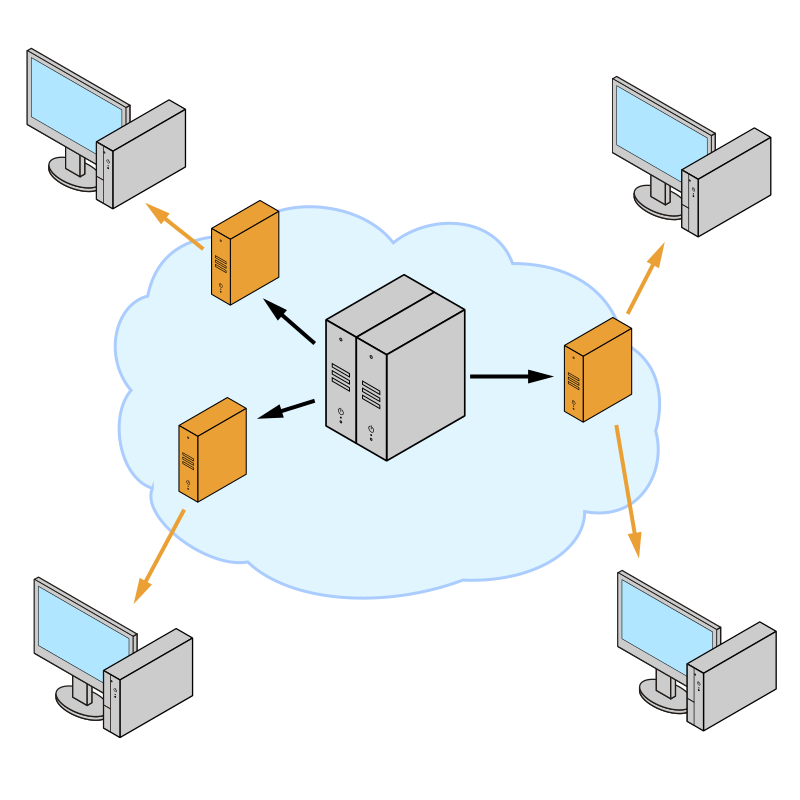
7.1 How CDNs Work
| Term | Meaning | AWS |
|---|---|---|
| POP | Edge location | CloudFront edge |
| Origin | Authoritative source | S3, ALB, API Gateway |
| Origin shield | Secondary cache layer | CloudFront Origin Shield |
| Cache hierarchy | L1 edge → shield → origin | Cost vs offload trade |
sequenceDiagram
    participant U as User
    participant CF as CloudFront POP
    participant OS as Origin Shield
    participant O as ALB origin

    U->>CF: GET /static/app.js
    alt cache hit
        CF-->>U: 200 from edge
    else miss
        CF->>OS: forward miss
        alt shield hit
            OS-->>CF: object
        else shield miss
            OS->>O: fetch
            O-->>OS: 200
            OS-->>CF: object
        end
        CF-->>U: 200 + cache populate
end7.2 CloudFront Deep Dive
| Feature | Purpose |
|---|---|
| Behaviors | Path patterns map to origins + TTL + policies |
| Functions | Lightweight header/url rewrite at edge |
| Lambda@Edge | Node.js full logic (with limits) |
| Signed URLs | Protect S3 media |
| Field-level encryption | Sensitive form posts |
7.3 Cache Key Design & Busting
| Mistake | Symptom | Fix |
|---|---|---|
| Ignore query strings | Wrong A/B asset | Cache policy includes needed qs |
| Too much in key | Low hit ratio | Normalize keys |
| No versioning | Stale SPA bundles | app.js?v=hash or immutable names |
7.4 Dynamic Content Acceleration
ALB origins with session cookies often bypass cache—use CloudFront for TLS edge, HTTP/2 multiplexing, keep-alive pooling to origin, and geographic latency reduction even on uncacheable APIs (dynamic acceleration).
7.5 Cost Analysis (Illustrative)
| Charge | Driver |
|---|---|
| Data transfer out | Internet egress from edge |
| HTTP/HTTPS requests | Miss-heavy traffic |
| Invalidation | First 1,000 paths/month free then per-path |
Rule: 1 TB/month static offload from EC2 to CloudFront often saves money vs direct ALB egress—validate with Cost Explorer.
Protect origins during viral static assets
Put S3 + OAC behind CloudFront; enable AWS WAF rate rules on ALB for API only—static traffic should not touch Spring at all.
8. Auto-Scaling with AWS
8.1 Target Tracking Policies
| Signal | Good for | Caveat |
|---|---|---|
| Average CPU | CPU-bound Spring | Misleading if blocked on I/O |
| ALBRequestCountPerTarget | Web tier | Needs healthy targets |
| Custom metric | Queue depth (SQS ApproximateNumberOfMessagesVisible) | Publish from app |
8.2 Step Scaling
Step policies add N instances when breaching thresholds—great for non-linear capacity needs.
8.3 Predictive Scaling
ML-based forecast for recurring cycles—pairs with scheduled patterns (daily news, sports).
8.4 Scheduled Scaling
Cron-like min/max changes before known events—cheaper than aggressive target tracking alone.
8.5 ECS Auto-Scaling
| Mode | Knob |
|---|---|
| Service auto scaling | Target tracking on CPU/RAM/ALB per task |
| Fargate | No instance management—task count only |
| Capacity providers | Split Fargate vs Fargate Spot |
8.6 Lambda Scaling
| Concept | Limit angle | Mitigation |
|---|---|---|
| Concurrency | Regional account cap | Reserved concurrency per function |
| Cold start | p99 latency | Provisioned concurrency |
| Downstream | RDS connections | RDS Proxy + small pools |
8.7 Best Practices
| Practice | Why |
|---|---|
| Cooldown | Prevent flapping |
| Instance protection | Protect long jobs |
| Lifecycle hooks | Drain before terminate |
| Warm pools | Cut scale-out latency |
flowchart LR
    M[Metric — CPU / RequestCount / QueueDepth]
    A[CloudWatch Alarm]
    P[Scaling Policy]
    C[ASG / ECS Service]
    CAP[Capacity]

    M --> A --> P --> C --> CAP
CAP --> M8.8 Scaling Policy Comparison
| Policy type | Responsiveness | Predictability | Cost risk |
|---|---|---|---|
| Target tracking | Smooth | High | Low–medium |
| Step scaling | Fast jumps | Medium | Spike overprovision |
| Scheduled | Exact for known peaks | Highest | Under/over if wrong forecast |
| Predictive | Proactive | Medium | Needs history |
9. Rate Limiting and Backpressure
Without rate limits, a single abusive tenant or bug can starve others—queueing delays explode and cascading failures follow.
9.1 Token Bucket
Burst allowed up to B tokens; refill at R tokens/sec. API Gateway usage plans resemble token bucket semantics.
9.2 Leaky Bucket
Smooth output rate—good for downstream protection; implementation often combined with queues (SQS).
9.3 Sliding Window
Precise per-client limits over rolling time—common in Redis (ZSET of timestamps).
flowchart TB
    C[Client]
    WAF[AWS WAF rate-based rule]
    APG[Amazon API Gateway throttling]
    ALB[Application Load Balancer]
    APP[Spring Boot + Resilience4j]
    DB[(Amazon RDS Proxy → Aurora)]

C --> WAF --> APG --> ALB --> APP --> DB9.4 AWS WAF Rate Limiting
| Mode | Scope | Typical rule |
|---|---|---|
| Rate-based | IP aggregation | 2,000 reqs / 5 min / IP on /login |
| Custom | Header keys | API key dimension via regex match |
9.5 API Gateway Throttling
| Knob | Effect |
|---|---|
| Account burst | Hard ceiling |
| Stage/method limits | Per-route budgets |
| Usage plans | Per API key |
9.6 Application-Level Rate Limiting — Resilience4j
application.yml:
resilience4j:
  ratelimiter:
    instances:
      catalog:
        limit-for-period: 200
        limit-refresh-period: 1s
        timeout-duration: 0
  circuitbreaker:
    instances:
      inventory:
        sliding-window-size: 100
        failure-rate-threshold: 50
        wait-duration-in-open-state: 30s
permitted-number-of-calls-in-half-open-state: 10// File: CatalogController.java
package com.example.scale.resilience;
import io.github.resilience4j.ratelimiter.annotation.RateLimiter;
import org.springframework.web.bind.annotation.GetMapping;
import org.springframework.web.bind.annotation.RestController;
@RestController
public class CatalogController {
@GetMapping("/catalog")
@RateLimiter(name = "catalog")
public String catalog() {
return "ok";
}
}// File: InventoryClient.java
package com.example.scale.resilience;
import io.github.resilience4j.circuitbreaker.annotation.CircuitBreaker;
import org.springframework.stereotype.Component;
@Component
public class InventoryClient {
@CircuitBreaker(name = "inventory", fallbackMethod = "fallbackStock")
public int stock(long sku) {
// HTTP call to inventory service — implementation omitted
if (sku == 0L) {
throw new IllegalStateException("inventory down");
}
return 42;
}
@SuppressWarnings("unused")
private int fallbackStock(long sku, Throwable t) {
return 0;
}
}// File: ResilienceApplication.java
package com.example.scale.resilience;
import org.springframework.boot.SpringApplication;
import org.springframework.boot.autoconfigure.SpringBootApplication;
@SpringBootApplication
public class ResilienceApplication {
public static void main(String[] args) {
SpringApplication.run(ResilienceApplication.class, args);
}
}Rate limit at the edge first
Application limits protect your JVM, but attackers can still burn ALB LCUs and NAT GW capacity. Pair WAF + CloudFront geo blocks with in-app Resilience4j.
9.7 Circuit Breaker Recap
| State | Behavior |
|---|---|
| Closed | Calls pass; failures counted |
| Open | Fast-fail; avoid hammering RDS |
| Half-open | Trial calls |
9.8 Bulkhead Pattern
Isolate thread pools per dependency—Resilience4j Bulkhead or separate ECS services so search cannot exhaust checkout threads.
resilience4j:
  bulkhead:
    instances:
      search:
        max-concurrent-calls: 20
        max-wait-duration: 0ms
10. Putting It All Together — Architecture for 10M+ Users
Single region, multi-AZ baseline
Route 53 → CloudFront (static) + WAF → ALB → ECS Fargate (Spring) → Aurora writer + 2 replicas → ElastiCache Redis cluster mode → S3 assets. Target tracking on ALBRequestCountPerTarget + CPU for the service.
Data path optimization
RDS Proxy in front of Aurora; cache-aside for catalog; DynamoDB for high-write sessions or feature flags if Redis ops cost dominates; SQS for async fan-out (email, search indexing).
Edge and safety
CloudFront behaviors split /api/* (forward cookies, low TTL) vs /static/* (immutable). WAF rate rules on login and password reset. KMS encryption for S3 and Secrets Manager.
Observability + autoscale hardening
CloudWatch dashboards: ALB p99, 5xx, UnHealthyHostCount, ElastiCache CurrConnections, Aurora ReplicaLag. X-Ray tracing from ALB → Spring → RDS Proxy. Predictive scaling + scheduled scale for campaigns.
Multi-region readiness
Route 53 latency-based routing to secondary region; Aurora Global Database or DynamoDB global tables for DR tiers; S3 CRR for static assets. RPO/RTO drive the bill—document them explicitly.
flowchart TB
    subgraph Users["Users global"]
        U[Web + Mobile]
    end

    subgraph Edge["Edge"]
        R53[Amazon Route 53]
        CF[Amazon CloudFront]
        WAF[AWS WAF]
    end

    subgraph Ingress["Ingress"]
        ALB[Application Load Balancer]
    end

    subgraph Compute["Compute — VPC"]
        ECS[Amazon ECS on Fargate — Spring Boot]
        XRAY[AWS X-Ray]
    end

    subgraph Data["Data services"]
        AUR[(Amazon Aurora PostgreSQL + replicas)]
        RP[Amazon RDS Proxy]
        RED[(Amazon ElastiCache Redis cluster)]
        DDB[(Amazon DynamoDB)]
        S3[(Amazon S3)]
    end

    subgraph Async["Async & events"]
        SQS[Amazon SQS]
        EB[Amazon EventBridge]
        L[AWS Lambda consumers]
    end

    subgraph Ops["Operations"]
        CW[Amazon CloudWatch]
        ASG[Application Auto Scaling]
    end

    U --> R53 --> CF --> WAF --> ALB --> ECS
    ECS --> RP --> AUR
    ECS --> RED
    ECS --> DDB
    ECS --> S3
    ECS --> SQS
    SQS --> L
    EB --> L
    ECS --> XRAY
    ALB --> CW
    ECS --> CW
    ASG --> ECS
CW --> ASG10.1 Component Sizing & Cost Estimation (Illustrative)
| Tier | Quantity example | Monthly cost order (us-east-1, On-Demand, indicative) | Notes |
|---|---|---|---|
| CloudFront + WAF | 50 TB egress + rules | $4k–$8k+ | Dominated by data transfer |
| ALB | 2 ALBs + LCU | $200–$800 | Rule-heavy configs cost more |
| ECS Fargate | 200 vCPU / 400 GiB steady | $15k–$25k | Spot cuts sharply |
| Aurora | 1 writer db.r6g.2xlarge + 2 replicas | $3k–$6k | I/O can dominate |
| ElastiCache | 3 shards, 2 replicas each | $2k–$5k | Memory-sized |
| DynamoDB | On-demand hot tables | Variable | Watch hot partitions |
Always replace these with your Cost Explorer CSV after a load test week.
10.2 Monitoring and Alerting
| Alarm | Threshold idea | Action |
|---|---|---|
| ALB TargetResponseTime p99 | > 500ms for 5m | Page + scale out |
| ALB HTTPCode_Target_5XX_Count | > 50/min | Rollback canary |
| Aurora ReplicaLag | > 1s sustained | Shed read load |
| Redis CPUUtilization | > 70% | Scale cluster shards |
10.3 Disaster Recovery & Multi-Region
| Tier | RPO | RTO | Pattern |
|---|---|---|---|
| Gold | < 1 min | < 15 min | Aurora Global, active-active read paths |
| Silver | < 15 min | < 1 hr | Cross-region read replica promotion runbook |
| Bronze | hours | hours | Backup restore to second region |
10.4 Latency Budget (Single-Region, Cached Read)
| Segment | Budget |
|---|---|
| DNS + TLS + edge | 20–80ms |
| ALB | 1–3ms |
| Spring + JVM | 5–30ms |
| Redis get | 0.5–2ms |
| Aurora replica (cache miss) | 1–5ms |
| Total p50 | ~30–120ms geo-dependent |
Measure the budget, don’t guess
Use CloudWatch Contributor Insights on ALB access logs and X-Ray segments to attribute latency—optimize the top segment first (often DB or N+1 queries).
11. Key Takeaways
11.1 Pattern Summary
| Problem | Primary AWS pattern |
|---|---|
| Uneven web load | ALB + target tracking autoscale |
| DB connection storms | RDS Proxy + smaller Hikari pools |
| Read-heavy | Aurora replicas + ElastiCache |
| Hot keys | DynamoDB write sharding / Redis hashtags carefully |
| Static offload | S3 + CloudFront + OAC |
| Thundering herd | TTL jitter + singleflight + SQS buffering |
11.2 Interview Tips
- Start from SLO (RPS, p99 latency, availability), then dimension ALB, ECS, Aurora, Redis.
- Always mention health checks, draining, and retry budgets.
- Explain why sticky sessions harm elasticity.
- Close with cost and operational risks—not only boxes.
11.3 Decision Framework
| Question | If “yes” lean |
|---|---|
| Need L7 routing/WAF? | ALB |
| Need static IP / extreme CPS? | NLB |
| Need JWT simplicity? | Cognito + ALB auth (or custom) |
| Need strong partition tolerance at huge scale? | DynamoDB for matching access pattern |
| Need complex SQL? | Aurora + read replicas + RDS Proxy |
One sentence to remember
Scale stateless compute horizontally behind ALB, protect shared data with pooling and caches, shed load at the edge, and prove everything with CloudWatch + load tests—not architecture cartoons.